
Running a business means watching costs, setting prices, and checking whether marketing pays off. These tasks are harder with a small budget or limited staff.
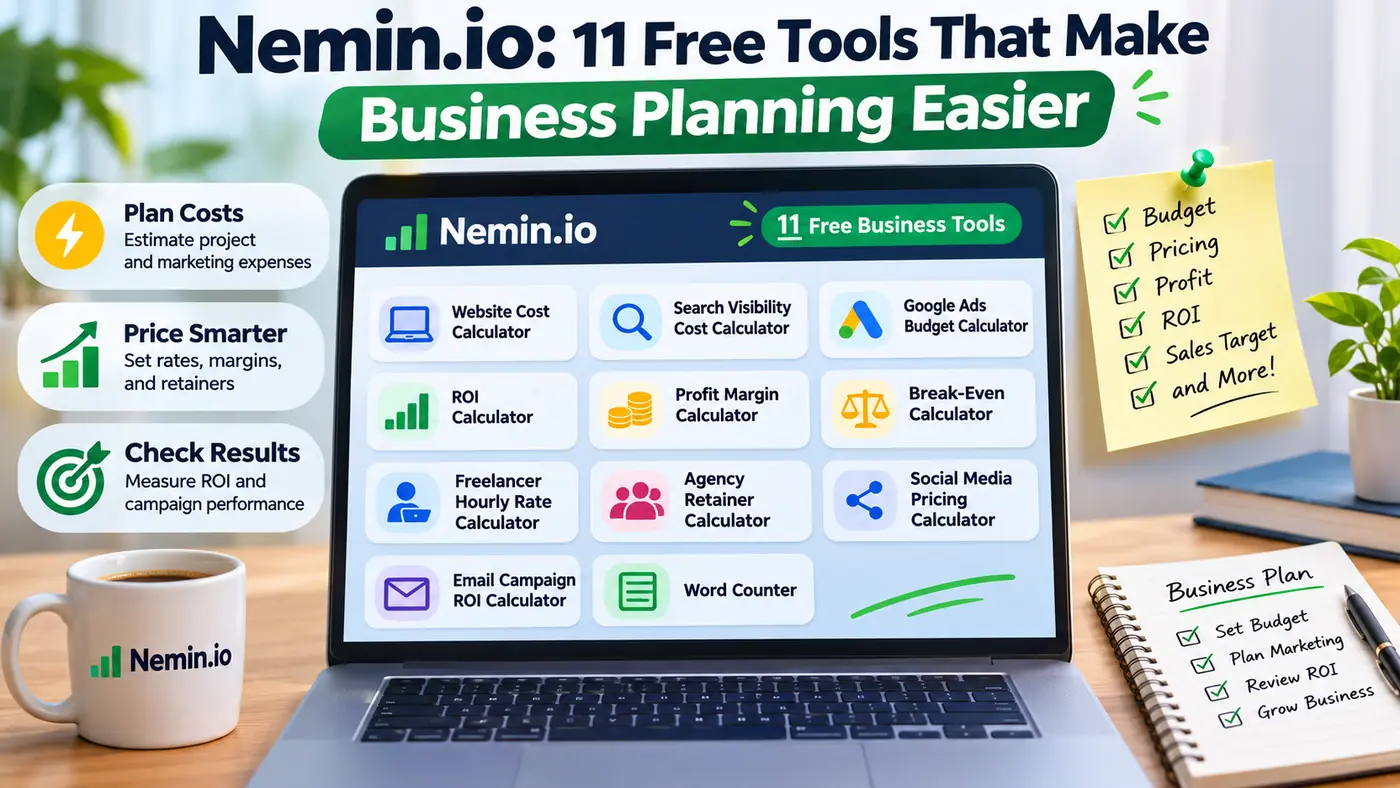
Nemin.io brings useful calculations into one place. Its free browser tools cover website budgets, advertising costs, profit, freelance pricing, and more. You can try different figures without building a spreadsheet or creating an account.
This guide explains all 11 tools, with practical examples and important limits for freelancers, startups, agencies, and business owners worldwide.
What Is Nemin.io and Who Can Use It?
Nemin.io offers free calculators for business planning and marketing. It turns your figures into estimates but does not manage finances or run campaigns for you.
Its collection covers two broad needs. Some tools calculate results from your own costs and revenue. Others suggest planning budgets using built-in pricing assumptions. That difference matters: accurate arithmetic does not mean an estimated price will match a real supplier’s quote.
Freelancers can prepare proposals, owners can test prices, and marketing teams can plan spending. Writers can check the length of articles and reports.
The tools are listed as free and do not require registration. Most price estimates are presented in U.S. dollars, so readers outside the United States should compare them with local rates before making commitments.
1. Website Cost Calculator for Project Budgets
A website often needs writing, platform setup, and maintenance alongside design. The Website Cost Calculator gives you a starting budget before requesting professional quotes.
It considers details such as page count, design level, platform setup, writing needs, and months of maintenance. Start with a basic five-page site, then change the scope to see how a larger project affects the estimate.
Treat its result as a discussion point, not a fixed quote. Custom booking systems, online stores, accessibility requirements, and third-party integrations can change the final cost. Ask potential providers for an itemized proposal that states exactly what is included.
2. Planning Monthly Search Visibility Costs
Improving how a business appears in unpaid search results usually involves ongoing work. Nemin.io includes a budget calculator for this activity, helping owners plan what they might spend each month instead of choosing a number without considering the workload.
Inputs include campaign type, site size, planned articles, locations, growth goals, and target topics. A neighborhood business has different needs from an international company.
This estimate does not predict traffic, sales, or a guaranteed position in results. Supplier rates and competition vary widely. Use the figure to compare service proposals and ask what work, reporting, and review schedule each monthly fee covers.
3. Google Ads Budget Calculator for Lead Goals
Paid advertising becomes easier to plan when you start with the number of leads you want. The Google Ads Budget Calculator connects a monthly lead goal with the expected landing-page conversion rate, average cost per click, and management fees.
For 30 leads at a 5% conversion rate, you need about 600 clicks. At $2 per click, that means $1,200 in advertising before management fees.
Actual costs can rise if clicks become more expensive or visitors convert less often. Compare your assumptions with past campaign reports whenever possible. A lead is not necessarily a paying customer, so also consider how many inquiries usually become sales.
4. ROI Calculator for Checking Business Returns
Return on investment, often shortened to ROI, compares what an activity earns with what it costs. This calculator is useful after advertising, a training program, equipment purchase, or other project where you can identify both the money spent and the revenue generated.
For example, $4,000 in revenue against $2,500 in total project costs leaves $1,500. Dividing that gain by the $2,500 cost gives a 60% return. This is a worked example, not a claim about what any campaign will achieve.
Include relevant fees, labor, and production costs. If several activities contributed to a sale, avoid crediting the full value to one campaign.
Also check cash flow. A profitable project can cause problems if customers pay long after expenses are due.
5. Profit Margin Calculator for Better Pricing
Sales revenue tells you how much money came in, but not how much you kept. The Profit Margin Calculator compares revenue with total costs to show profit and the percentage of revenue remaining after those costs.
Imagine a service brings in $80 and costs $50 to deliver. The difference is $30, giving a 37.5% margin. That is different from markup, which compares the $30 gain with the $50 cost instead of the selling price.
Include payment fees, packaging, refunds, subcontractors, and overhead. Testing a lower price may show that a tempting discount would leave little room for unexpected costs.
6. Break-Even Calculator for Sales Targets
Before opening a shop or launching a product, it helps to know how many sales will cover your costs. The Break-Even Calculator uses fixed costs, selling price per unit, and variable cost per unit to find that threshold.
Say fixed monthly expenses are $1,200. Each product sells for $40 and has $16 in variable costs. Each sale then contributes $24 toward fixed expenses. You would need 50 sales to break even under those assumptions.
The tool is especially helpful when deciding whether a sales target is realistic. Check whether your figures include delivery, transaction charges, and returns. Breaking even means covering the costs entered; it does not automatically mean the owner has earned a salary.
7. Freelancer Hourly Rate Calculator for Sustainable Income
Competitor rates can overlook unpaid administration, software, time off, and client outreach. The Freelancer Hourly Rate Calculator starts with your income goals and available work hours.
It asks for annual income targets, business expenses, billable hours per week, weeks worked each year, and a tax buffer. These details help distinguish time available for work from time that can actually be billed to clients.
For a simple example, suppose you need $60,000 in annual income plus $12,000 in expenses and expect 1,200 billable hours. The starting rate is $60 per hour before any additional tax allowance. Fewer paid hours would push that rate higher.
Clients may not accept the calculated rate. Experience, location, and the value of your service still affect what you can charge.
For fixed fees, estimate hours, allow for revisions, and define scope changes. Otherwise, extra requests can quickly reduce earnings.
8. Agency Retainer Calculator for Recurring Services
A monthly retainer provides ongoing support for a set fee, but pricing it badly can make steady work unprofitable. The Agency Retainer Calculator helps service providers account for hours, hourly rates, software costs, and their desired profit margin.
Consider 30 hours of work at $75 per hour, plus $150 in monthly software expenses. Directly estimated costs total $2,400. To achieve a 20% profit margin on those costs, a monthly fee would need to be $3,000.
A good agreement also defines deliverables, meeting time, revision limits, and response expectations. Review the estimate whenever the workload changes. An affordable fee for one client may not cover another client’s heavier reporting or support needs.
9. Social Media Pricing Calculator for Service Packages
Managing social accounts involves more than publishing a few posts. Planning, design, short-form video, reporting, and coordination all take time. The Social Media Pricing Calculator helps freelancers and agencies estimate a monthly service fee based on the work involved.
Inputs include the number of platforms, posts per week, short videos per month, managed ad spend, and reporting level. These choices can help distinguish a basic posting package from a more demanding service with regular video production.
Use the estimate to describe a clear package rather than promising unlimited work. Clarify whether advertising spend is separate from your management fee. Local labor rates and content complexity may also make a real quote higher or lower.
10. Email Campaign ROI Calculator for Marketing Results
Email campaigns have costs even when messages are inexpensive to send. A mailing platform, design work, offers, and staff time all affect the outcome. The Email Campaign ROI Calculator estimates revenue and return using expected audience behavior.
It considers list size, open rate, click-through rate, conversion rate, average order value, and campaign cost. Enter realistic figures from past campaigns if you have them. Be careful about how the click-through percentage is defined, since a rate based on opens differs from one based on all delivered messages.
An estimated return cannot prove that an email caused every sale. Customers may have seen other promotions first. Consider unsubscribe trends, delivery problems, repeat purchases, and the quality of new customers when judging the campaign’s overall value.
11. Word Counter for Everyday Content Tasks
The Word Counter is the simplest tool in the collection, but it serves a different purpose. Instead of estimating money, it checks the length and structure of text. That makes it useful for writers, editors, marketers, and students preparing content to a set length.
Paste or type your draft into the field and analyze it. The tool displays words, characters, sentences, paragraphs, and an estimated reading time. These figures can help you shorten a long introduction or check whether a client brief has been met.
Word counts help meet length requirements, but they cannot judge accuracy, clarity, or usefulness.
Review your draft before publishing. For confidential client material, check the site’s privacy information before pasting text into any online service.
How to Get More Useful Results From the Tools
A calculator is only as helpful as the numbers entered. Use recent invoices, sales records, supplier quotes, or campaign reports where available. If you are starting a business and lack past figures, make the uncertainty visible rather than treating a guess as fact.
A practical way to compare possible outcomes is to test three cases:
- Conservative: Higher costs or fewer sales than expected.
- Expected: Figures supported by your current plans.
- Optimistic: Better results that are still plausible.
Change one input at a time so you can see which assumption matters most. Record your inputs alongside each result, including the currency and time period. Otherwise, a monthly cost can easily be mistaken for an annual one.
Nemin.io is primarily designed around U.S. pricing assumptions. For UK or international use, formula-based calculations remain useful when amounts are entered consistently, but built-in price estimates need local checks. For major tax, legal, or financing choices, consult a qualified professional.
Final Thoughts
Nemin.io offers a straightforward starting point for common business decisions. Its 11 free tools cover costs, advertising budgets, rates, margins, returns, sales thresholds, and writing length. They can help you prepare questions and compare possible outcomes without complicated software.
Always distinguish results from guarantees. A profit calculation does not promise future sales, and an estimated website cost is not a provider quote.
Choose the calculator that matches your immediate decision, use realistic inputs, and keep a record of what you learn. Small improvements in pricing and budgeting can make daily operations easier, even when the final decision still requires judgment.
(FAQs)
Is Nemin.io free to use?
Yes. The site lists all 11 tools as free and says that you can use them directly in your browser. There is no account required to make a calculation.
Do I need to download an app?
No. The calculators operate through a website, so you can open them in a browser without installing separate software. A current browser and an internet connection are sufficient for access.
Which tool is most useful for a small business?
That depends on your immediate problem. Use the Break-Even Calculator to set a sales threshold, the Profit Margin Calculator to review pricing, or the Google Ads Budget Calculator to plan paid campaigns.
Can UK businesses use these calculators?
Yes, but check the assumptions first. Calculations based entirely on your own figures can work with pounds when all amounts use the same currency. Built-in price estimates are mainly U.S.-oriented.
Are the estimated costs and returns guaranteed?
No. The tools calculate from entered values or built-in assumptions. Actual quotes, advertising costs, and sales results may differ, especially when market conditions or project requirements change.
Does Nemin.io replace accounting software?
No. It supports individual planning calculations rather than full bookkeeping, invoicing, tax filing, or financial reporting. Keep proper records and use dedicated accounting tools when your business requires them.