

Good writing takes more than choosing the right words. It also means knowing whether important terms appear in a draft often enough without making sentences sound forced.
The Zuhio Keyword Count Checker offers a focused way to review repeated terms in written content. It is designed for people who want a quick count rather than a complicated reporting system.
Still, a count is only one part of reviewing an article. This guide explains what the checker does, how to use its results, where it saves time, and why human editing remains essential.
What Is the Zuhio Keyword Count Checker?
Zuhio is a website that presents lightweight tools for everyday work. Its text checker focuses on finding how often chosen words or phrases appear in material that a user pastes into the page.
The basic purpose is simple: compare a planned list of terms with a finished draft. This is especially helpful when a brief contains several distinct expressions.
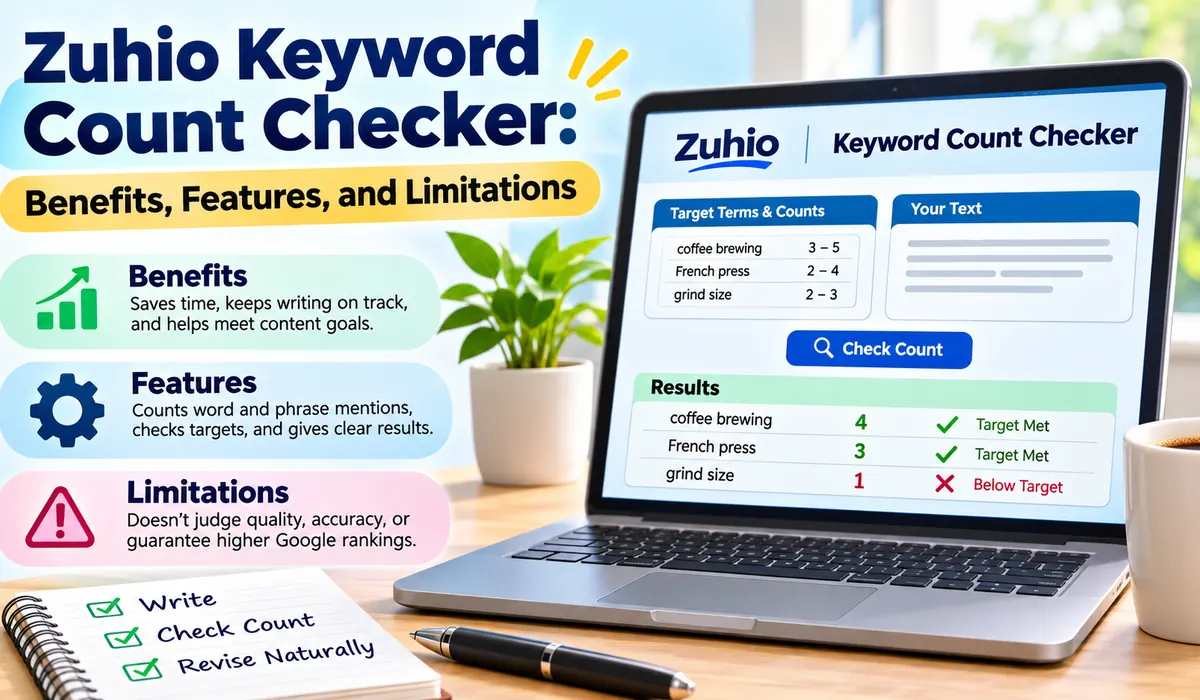
The visible tool centers on text input and a button to run the check. Hands-on descriptions also report support for target mention ranges, allowing users to compare actual appearances with an expected minimum.
It does not replace research, fact-checking, proofreading, or the judgment needed to explain a topic in a useful and engaging way.
Why Checking Repeated Terms Matters
A writer may finish an article and realize an important subject is barely mentioned. A simple frequency check can uncover that oversight before the piece reaches a client or goes live.
The opposite problem also matters. Repeating the same expression too often can make an article tiring to read.
Consistency is particularly useful when several writers work from one brief. Each person can review the same expectations before submitting their work.
However, there is no universal percentage that makes an article good. Readers care about clear answers, helpful details, and natural sentences. A frequency report should support those goals rather than control the writing.
Main Features You Can Expect
The tool’s central function is counting appearances of selected words and multiword expressions. This gives users a concrete figure to discuss during edits.
Detailed demonstrations of the checker describe two main input areas. One holds a list of terms and expected mention targets; the other holds the complete article or other text being reviewed.
After the check runs, the reported results identify counts and whether entries meet their minimum targets.
Some online descriptions claim it displays density percentages, word totals, or other advanced measurements. Those features are not consistently shown in detailed demonstrations, so users should not assume they are included in the current version.
How to Use the Checker Step by Step
Start with a completed draft, not an empty page. That way, the counts reflect a genuine attempt to explain the subject, not filler added to reach a target.
Next, prepare the terms you need to review. Independent demonstrations suggest that each line may require a target count or range, separated from its phrase by a tab character. The precise input rules can change with updates.
Paste the prepared list into the first input area. Then paste the full draft into the second area. Include headings only if you want their appearances to count along with the main body.
Run the check and read the figures beside each entry. Pay attention to missing terms first, but also inspect phrases that appear much more often than you intended.
A quick working routine is easy to remember:
- Finish the draft; compare missing terms with the brief; revise naturally and check again.
Preparing a Useful List of Target Terms
A good list starts with the article’s real subject. Include the main concept, important names, and a few related expressions that readers genuinely need to understand.
For a guide about home coffee brewing, for example, the list might contain French press, grind size, water temperature, and brew time. If the interface asks for minimum and maximum mentions, treat those numbers as editing goals rather than scientific rules.
When transferring data from a spreadsheet, place expressions in one column and ranges in another. Copying adjacent cells can preserve the tab separation described in hands-on guides. Check the formatting before running the tool.
How to Read the Count Results
A count tells you how many matches the checker found in the pasted text. If a phrase shows zero, it may be missing, spelled differently, or written in a way the matching system does not recognize.
If a result indicates that the minimum has been met, that simply means the tool found enough matches for the supplied target. It does not judge whether the sentences are accurate or enjoyable.
Some reported versions group results into missed and satisfied entries. That helps an editor find unfinished requirements quickly.
Read the figures alongside the actual article. A phrase used four times across four useful sections may be fine. The same phrase repeated four times in one short paragraph may need a rewrite.
Practical Benefits for Independent Writers
For freelancers, one clear benefit is less manual checking. A client brief may include ten or more required expressions. Reviewing them through a single input can reduce repetitive searching near a deadline.
The checker also makes the final editing stage more organized. Instead of guessing whether a planned topic was mentioned, a writer can see an approximate count and decide whether to revisit that section.
New writers may find it helpful for learning restraint. If an expression appears in nearly every paragraph, the report can prompt a closer look at wording, sentence variety, and unnecessary repetition.
Its simplicity is another advantage. A browser-based utility can fit into an ordinary writing routine without a large dashboard.
Benefits for Editors and Publishing Teams
Editors often review work against an agreed brief. A count checker provides a consistent starting point, especially when several contributors interpret instructions differently or work in separate documents.
A team can prepare a shared list before assigning an article. Writers can run their own checks, while editors can use the same list during the final review.
For agencies that receive spreadsheets from clients, the ability to check multiple entries can be especially practical. It turns a repetitive task into a short review, leaving more time for structure, examples, and accuracy.
An editor must still confirm that every section answers a real question and that any required phrasing feels natural within the surrounding text.
Where It Fits in a Writing Workflow
The best time to run a count check is after the first strong draft.
Begin by outlining the reader’s questions. Write clear answers, explain unfamiliar ideas, and add examples where they help. Only then should you compare the document with any required terms or mention ranges.
After checking the counts, revise the passage rather than simply inserting words. If a missing phrase belongs in a section, add a useful explanation around it. If it feels unrelated, reconsider whether the brief needs adjustment.
Finish with a normal editorial review. Read the text aloud, check facts, remove repeated claims, and look at the transitions between sections.
What the Checker Cannot Tell You
The tool cannot determine whether an article answers a reader’s question well. A page may contain every requested phrase and still be confusing, outdated, or too shallow to be useful.
It also does not establish how difficult a topic is to compete for online. That requires a very different kind of analysis.
A high number should not be treated as a promise of better placement in Google. Search systems assess many signals, and forced repetition can harm readability. There is no reliable magic count for every subject.
The current interface is not clearly documented as a live-page scanner, full grammar editor, or comprehensive site auditor. You should expect to paste text rather than assume it can examine an entire website automatically.
Finally, the checker cannot decide whether a required phrase is accurate. For example, a product name might have changed or a claim might need correction.
Accuracy, Matching, and Text Formatting
Simple text-matching tools have limits. They may count a sequence of letters inside a longer word, or they may treat punctuation and variations in spacing differently.
For example, a search for cat may also match the beginning of category if the system does not require complete words. Similarly, singular and plural versions may be counted together in some cases but separately in others.
Capital letters can also affect results, depending on how matching works. Hands-on reports describe case-insensitive checks, but it is still wise to test a short sample when the exact behavior matters for a job.
If the total seems wrong, copy a small paragraph into the checker and compare the reported result with a manual count.
Common Problems and How to Fix Them
One reported issue is clicking the button without receiving visible results. In detailed tests, this sometimes happened when the list did not follow the input format the page expected.
Check whether every entry has a proper range and whether a tab separates the expression from its numbers. A spreadsheet may be easier for preparing this format than typing spaces into a plain text box.
Another problem is an unexpected zero. Look for spelling differences, unusual punctuation, extra spaces, or a reordered phrase. A tool that checks exact sequences may not recognize a natural variation with the same meaning.
If the output still looks questionable, refresh the page and try a short, non-sensitive example. Compare the count with your document editor’s find function.
Privacy and Using Online Tools Safely
Pasting text into any outside website deserves some care. Unreleased plans, private client drafts, and personal information require more caution than ordinary public material.
Before using a browser tool for private work, review its current privacy information and the rules of any agreement covering the document. Do not assume that a simple interface means pasted material is never stored or transmitted.
Some reviewers have described the counting process as running locally in the browser. That is encouraging if accurate, but it is not a substitute for a clear, current explanation of how the service handles data.
For sensitive text, use an approved internal utility or a trusted document editor instead. Convenience should never outweigh confidentiality or the need to protect someone else’s information.
Final Thoughts
Zuhio Keyword Count Checker is most useful as a focused editing assistant. It helps writers compare planned expressions with the words actually present in a draft, making routine checks easier to manage.
Its strengths are simplicity, quick counting, and practical use with multi-entry writing briefs. Its figures are useful signals, not a complete quality score.
A sensible approach is to write for people first. Use the figures to catch omissions or awkward repetition, then review the article for clarity, truthfulness, and flow. That balance makes counting helpful instead of distracting.
For research, deep editing, or full website analysis, it is better treated as one aid within a broader workflow.
Frequently Asked Questions (FAQs)
Is the Zuhio tool free to use?
It has been described as a free browser-based checker, with no account required in published demonstrations. Availability and any usage rules can change, so confirm the terms shown on the live page before relying on it.
Can it check several phrases at once?
Hands-on demonstrations show a list-based process that checks multiple entries against one pasted draft. The list may need a specific layout, including mention ranges, so follow the current input instructions carefully.
Does it show a density percentage?
Do not assume it does. Although some descriptions mention percentages, detailed demonstrations of the main checker show counts against target ranges rather than a clear density report. Check the current display for any changes.
Can it analyze a published website automatically?
The documented workflow uses pasted text rather than a website address. To review a published article, copy the relevant content into the input area, and remember that any omitted headings or captions will not be counted.
Will using it improve Google rankings?
Not by itself. Counting repeated terms cannot guarantee visibility. Helpful answers, correct information, readable organization, and a good user experience matter more than reaching a fixed number of mentions.
What should I do if the results seem wrong?
Check spelling, spaces, punctuation, and the required list format. Then test a short paragraph with a known count. If the numbers still disagree, verify them manually or use another trusted editing tool.